Stop shipping orders nobody confirmed.
Every new Shopify order gets a WhatsApp message with Confirm and Cancel buttons. Your store updates itself from the customer’s tap — no staff member copying statuses between two screens.
Total: PKR 5,025
Please confirm your order:
Confirmation that closes the loop.
The customer taps one button and your store reflects it immediately — not in a spreadsheet someone updates at the end of the day.
Confirmed orders are tagged in Shopify, so your team can filter and ship with confidence.
Cancelled orders are properly cancelled in Shopify — stock goes back to inventory and payment holds are released.
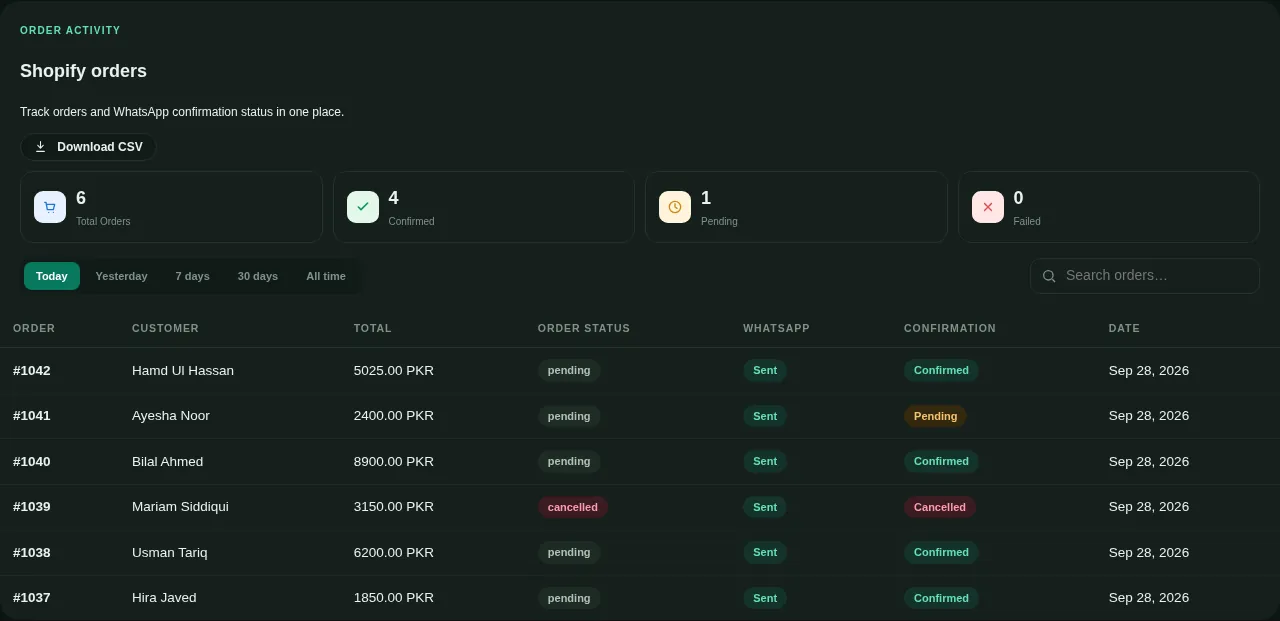
Order status, totals and confirmation live in one table you can export any time.
Repeat webhooks from Shopify never create duplicate messages or duplicate rows.
Three steps, and we do two of them.
Connect your number
We register your business number on the official WhatsApp Business API and get your templates approved by Meta.
Install on Shopify
You type your store address and press Install. Shopify itself shows you what access we ask for — we never see your login.
Map your message
Pick the template and choose what goes in each blank. The screen shows your template’s real wording so nothing lands in the wrong place.
Beyond confirmation
Payment received, shipped, out for delivery, delivered — each order event can carry its own WhatsApp message.
Abandoned checkouts
Reach the customer on the channel they actually read, while the cart is still warm.
Every buyer becomes a contact
Orders build your contact list automatically, tagged and ready for your next campaign.
Shopify questions.
Do you need my Shopify login?
What if a customer taps Cancel?
Will customers get duplicate messages?
Does this work with cash on delivery?
See it on your own store.
Message us and we will walk through your order flow and show you exactly what your customers would receive.