Turn WhatsApp into your best sales channel.
Confirm COD orders automatically, answer customers with AI, and run one shared inbox for your whole team — all on the number your customers already message.
Total: PKR 5,025
Please confirm your order:
Cash on delivery only works if the order is real.
This is the real thing — not a mock-up.
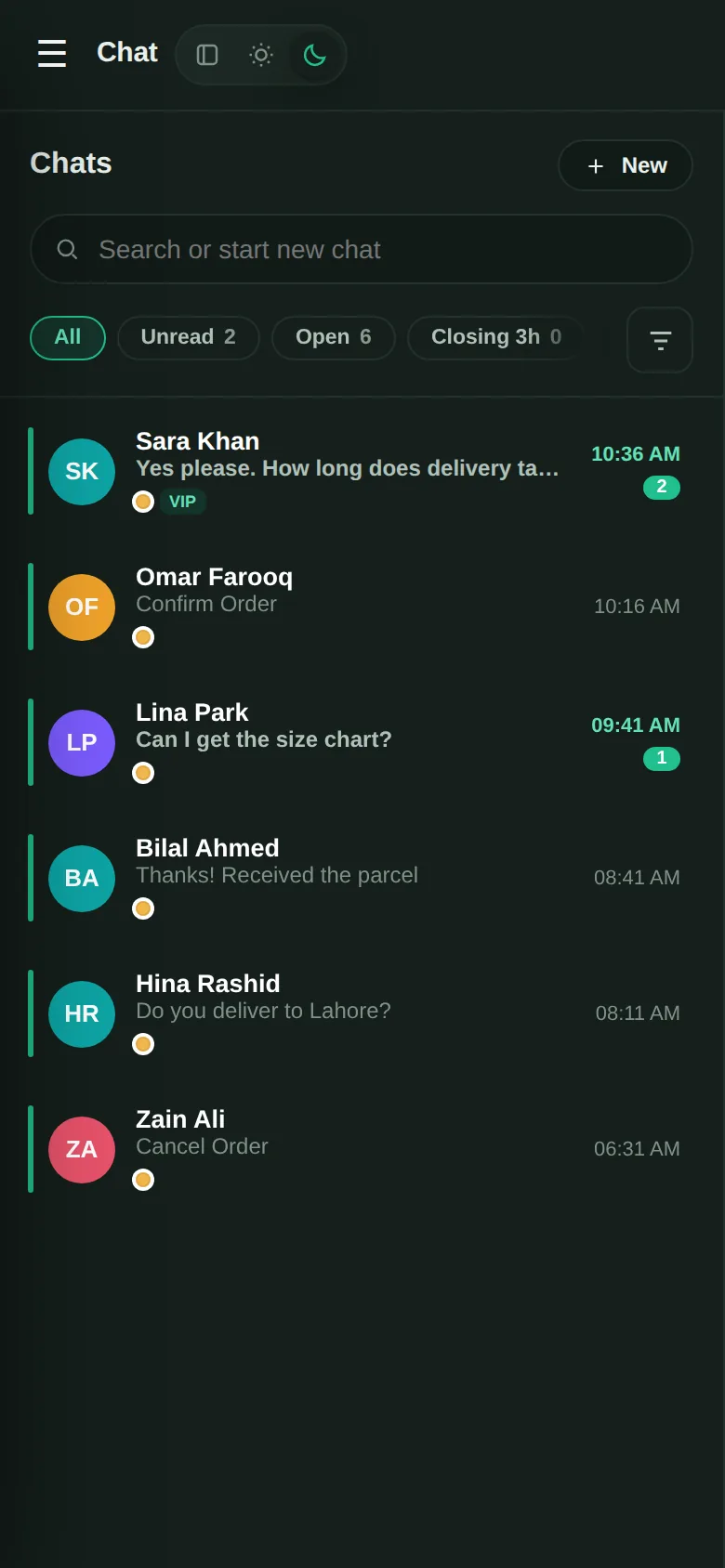
Every screen below is the actual Rabta Chat portal, shown with sample data.
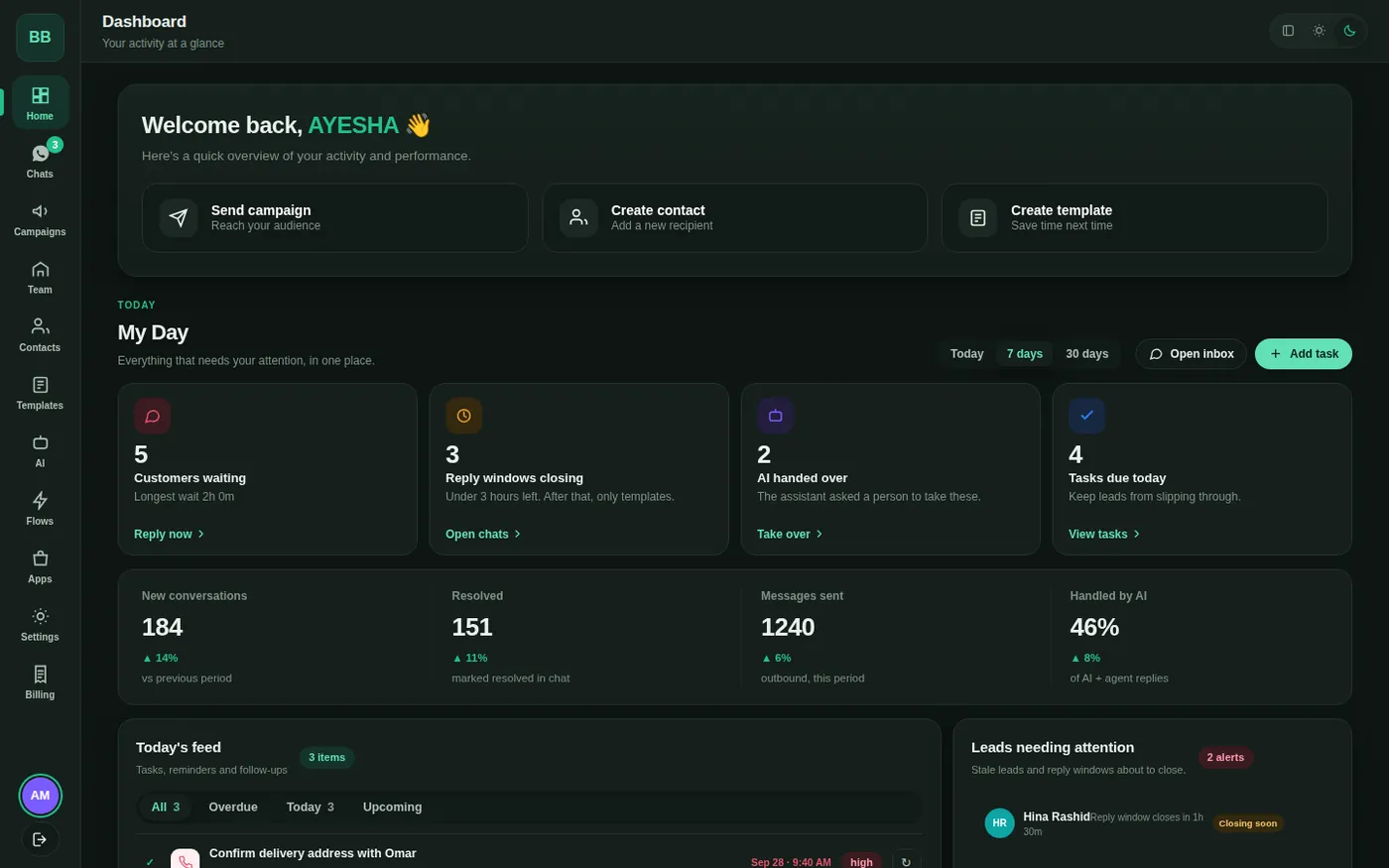
My Day — who is waiting, which reply windows are closing, and what the AI handed over, in one place.
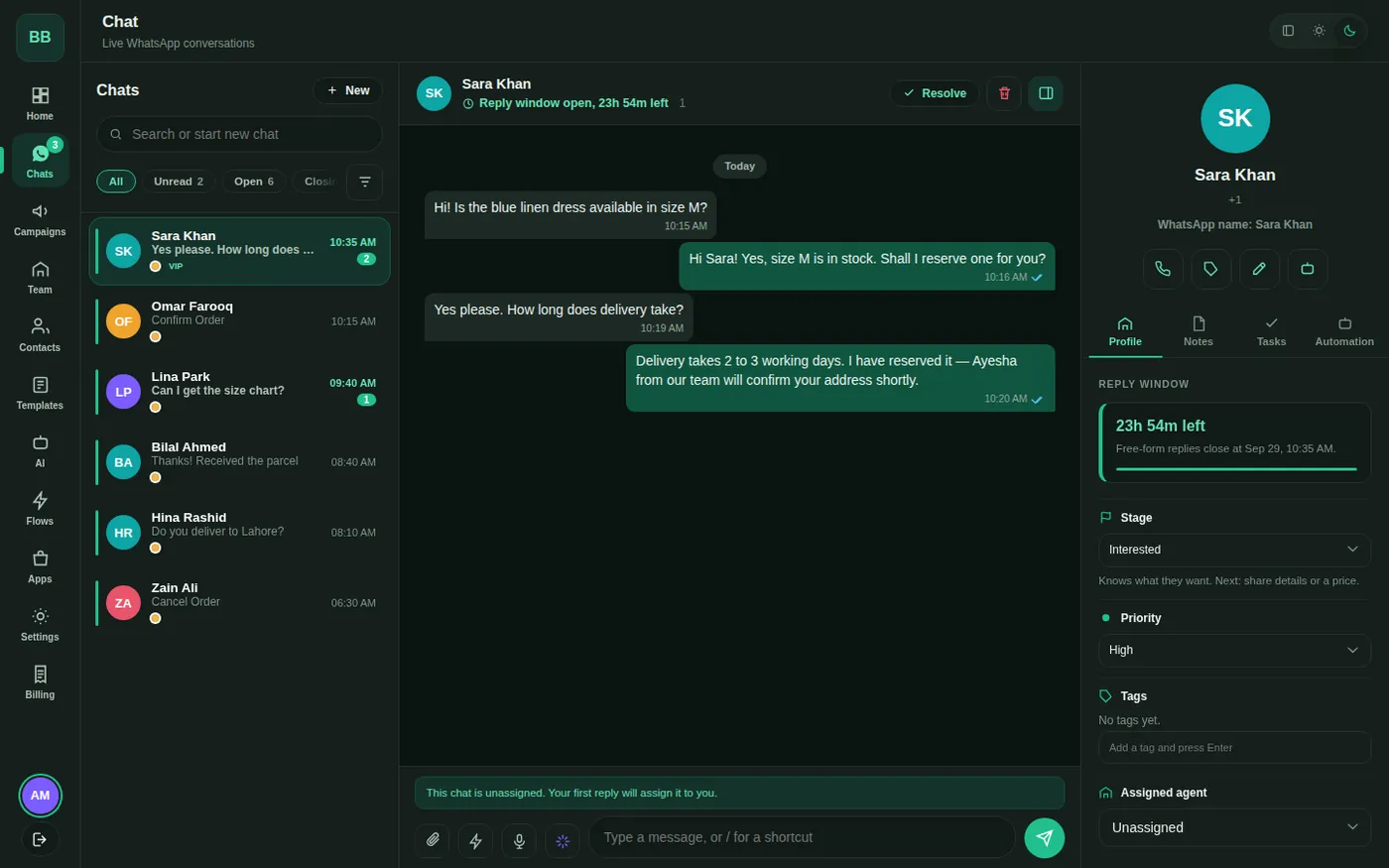
One number, every agent. Assign chats, see the customer’s stage and priority, and reply from the same screen.
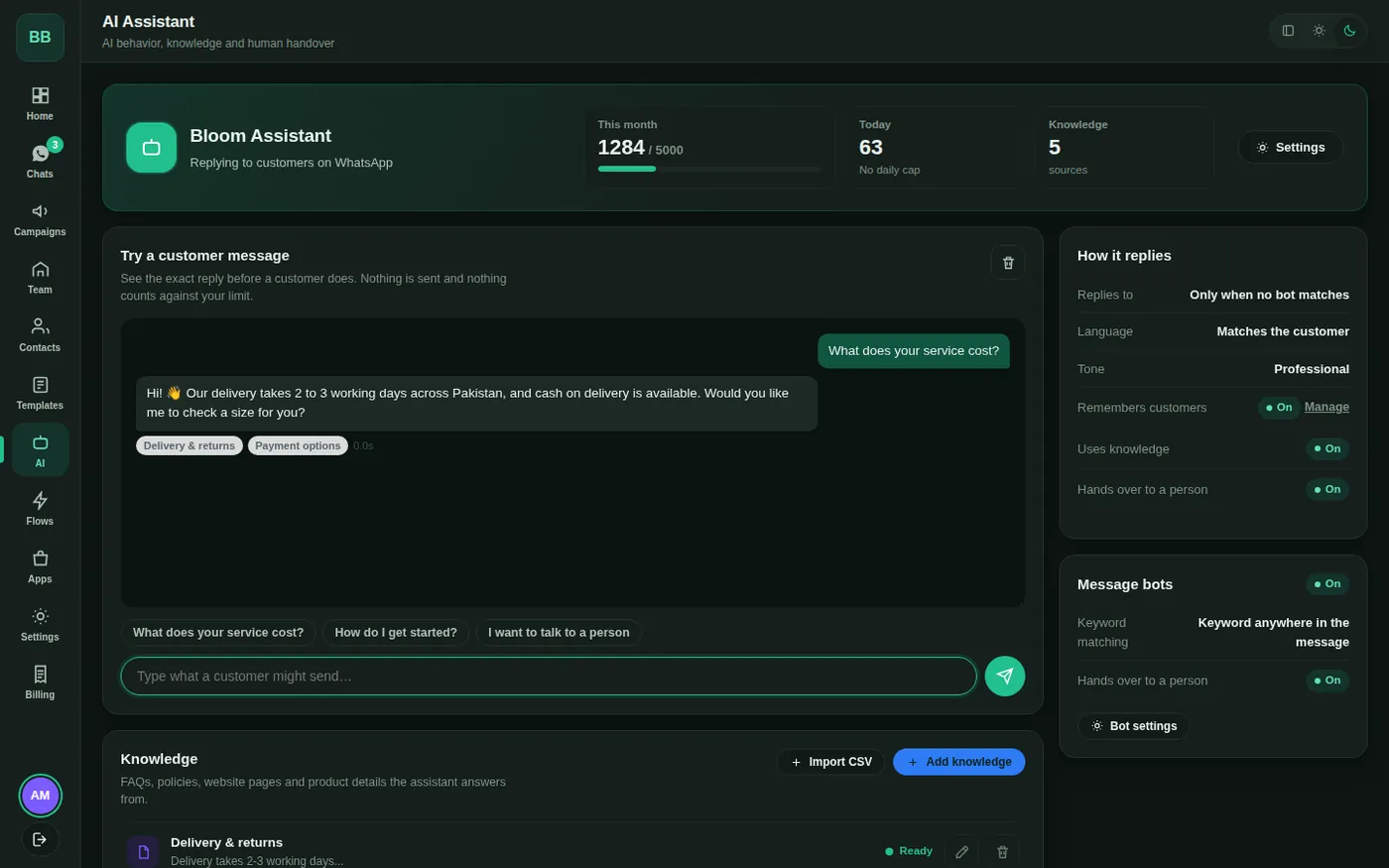
Test before it talks to a customer. See the exact reply, and which of your own knowledge it used.
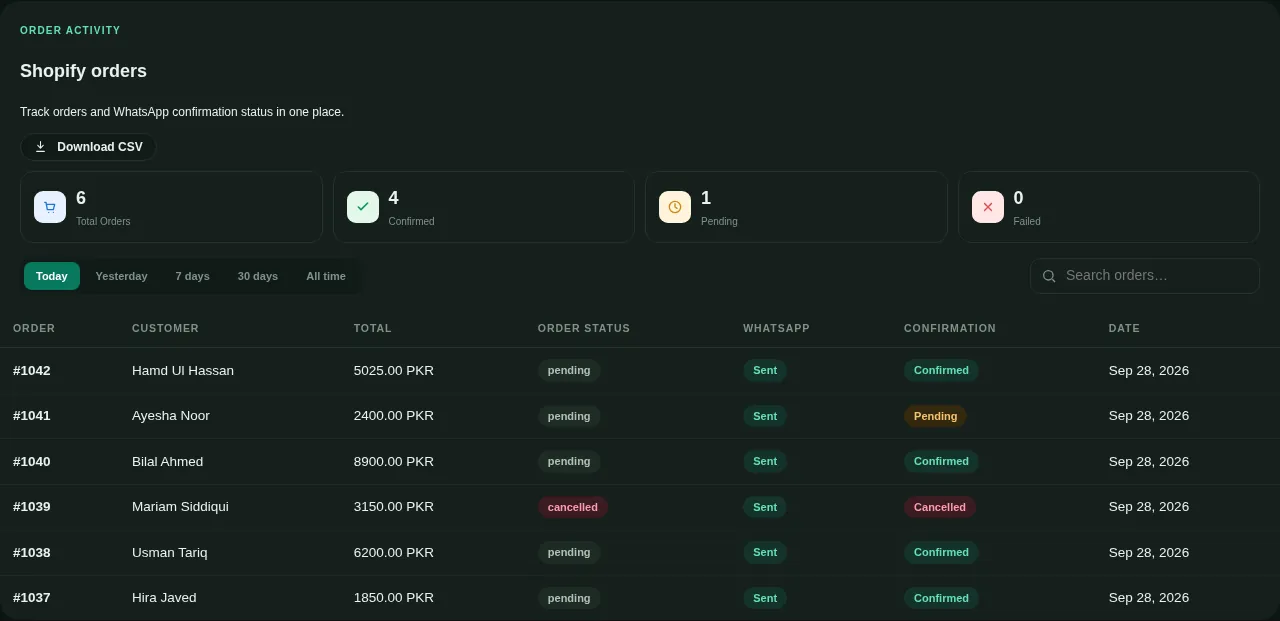
Every order, its message and the customer’s answer — confirmed, pending or cancelled — in one exportable table.
Every order confirmed before it ships.
A WhatsApp message with Confirm and Cancel buttons goes out the moment an order arrives. The customer taps once; your store updates itself.
Confirmed orders are tagged in Shopify for your team to ship.
Cancelled orders are cancelled properly — stock returns to inventory.
Works with Shopify, WooCommerce and your own website.
One number. Your whole team.
Stop passing a single phone around the office. Every agent has their own login, and every chat has an owner.
Assign conversations, leave private notes, mark them resolved.
See the customer’s reply window and stage at a glance.
History stays with your business, not on someone’s handset.
Answers the repeat questions. Knows when to stop.
Teach it your FAQs, prices and policies. It replies in the customer’s language and hands the chat to a person the moment it is unsure.
Trained only on the knowledge you give it.
Choose its tone — professional, friendly, casual, warm or playful.
Test any customer message before it goes live.
Build journeys by joining blocks.
Greet, ask a question, branch on the answer, tag the contact, or bring in a person. No code, and you can change it any time.
Welcome first-time customers automatically.
Route people to AI or to a human based on what they choose.
Runs in Urdu and English.
Live in a day, not a quarter.
We handle the WhatsApp Business API approval and the store connection. You approve one screen and start replying.
Connect your number
We register your business number on the official WhatsApp Business API with Meta. Your existing number, your brand name, the verified business look.
Link your store
Type your store address and press Install. The store asks for your permission directly — we never see your login or password.
Start confirming
Every new order gets a WhatsApp message with Confirm and Cancel buttons, and your store updates itself from the customer’s tap.
What could confirmation save you?
Move the sliders to match your store. Everything here is your own data — nothing is sent anywhere.
An estimate from your own numbers. The reduction is an assumption you can change — real results depend on your customers, products and couriers.
Check this with us on WhatsAppOne platform, set up for what you actually do.
Shopify
Confirm COD orders, tag confirmed ones, and really cancel the rest — stock and payment holds included.
Learn more →WooCommerce
The same order-confirmation flow for your own WordPress store, with no extra plugins to wire up.
Learn more →Small business
One shared inbox your whole team answers from, instead of one phone passed around the office.
Learn more →Appointment booking
Take bookings on WhatsApp and send reminders automatically, so fewer people forget to show up.
Learn more →WhatsApp Business API
The official API, registered under your own business name — not an unofficial workaround that can get you banned.
Learn more →Pricing
Plans that scale with your order volume, with Meta’s own message charges passed through at cost.
Learn more →Reply from anywhere, like a real app.
Open the portal on your phone and add it to your home screen. It behaves like an installed app — with the same inbox your team sees on a computer.
Installs from the browser on Android and iPhone — nothing to download from a store.
Every agent signs in with their own login, so chats never depend on one person’s handset.
The same conversation, assignments and notes on phone and desktop.
If your customers message you, this fits.
E-commerce
- Order confirmation
- Shipping updates
- Abandoned-cart nudges
Clinics & health
- Appointment reminders
- Report ready alerts
- Follow-up check-ins
Salons & spas
- Booking on WhatsApp
- Day-before reminders
- Review requests
Real estate
- Instant listing shares
- Site-visit booking
- Lead follow-up
Education
- Admission enquiries
- Fee reminders
- Class notices
Restaurants
- Direct orders
- Table reservations
- Delivery status
Travel & tourism
- Booking confirmations
- Itinerary changes
- Support in one thread
Retail & wholesale
- Catalogue sharing
- Repeat-order reminders
- Broadcast offers
Questions we get every week.
Do I need to give you my store password?
Can I keep my current WhatsApp number?
Will the AI reply to everything?
How long does setup take?
What does it cost?
Tell us what you need.
Answer three quick questions and we’ll pick it up on WhatsApp with your details already in the chat — a real reply from a person, not a ticket number.